
Free iMovie Music Download and Usage
iMovie is a unique video editor that is user-friendly, intuitive and feature-rich. One of the best video editing applications in the world. It has billions of users all over the globe. With it, you're able to make fantastic video from videos, photos and of course music.
Is there free music on iMovie?
Yes, iMovie comes with dozens of free soundtracks and sound effects for you to use in your movie projects. You can also use the background music of iMovie themes for free.
- > Part 1. Free music included in iMovie
- > Part 2. How to add free Music to iMovie
- > Part 3. Get more free music from Mac Video Editor
- > Part 4. Download free music for iMovie from YouTube
Free Music Included in iMovie (Various Versions)
There are about 100 free music can be found on iMovie 10.3. It might be different in different versions of iMovie. You can freely use iMovie music to make videos and uploading to YouTube for non-commercial use. Sometimes, social platforms like YouTube or Facebook might mistakenly flag the iMovie soundtracks as copyrighted materials. If so, you could appeal to them. If necessary, you could also request permission from Apple to use any of its content. These soundtracks and sound effects are royalty-free: https://www.apple.com/legal/contact/. For convenience, you can download Music from YouTube free music library to make videos for YouTube with iMovie.
The following YouTube videos enable you to preview many iMovie free music. However, you would not find some music in the latest version because it may come from other versions of iMovie. To download the YouTube playlist of iMovie music to MP3, you need a YouTube downloader like AllMyTube for Mac.
How to Add Free Music to iMovie
In this section, you'll learn about how to add free music to iMovie and set as background music of your movie projects.
How to Add Music to iMovie on Mac
If you downloaded online music to your macOS, you need to import them to your iMovie library first.
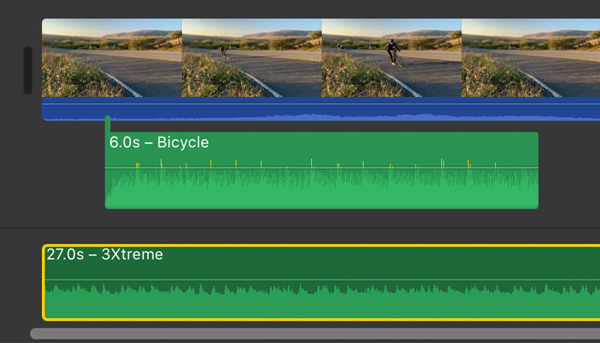
- With iMovie open, go to the top Audio tab and choose desired category. You'll see the all available music in the media browser. To import downloaded music, click the Import (up arrow) button, and choose your music in the pop-up browser.
- Locate your desired music, and drag and drop to the timeline. Here you could either connect the music to a specific clip, or drop to the audio track at bottom to set as the background music of your movie project.
How to Add Music to iMovie on iPhone/iPad
The logic of adding music to iMovie on iPhone or iPad is different from iMovie for macOS.
- With your iMovie for iOS project open in the timeline.
- Tap the + (Add Media) button. You can then choose Soundtracks or Sound Effects. The selected soundtracks will be set as the background music. To add sound effects, you need to move the playhead to the desired clip first. It'll be only applied to the connected clip.
- If necessary, you can change the background music to foreground music so you can move it to anywhere on the timeline. To do so, tap the soundtrack and select Foreground.
Get More Free Music from Mac Video Editor
iMovie music are awesome, but there are only 100 or so. As an iMovie alternative, it includes 1000+ royalty-free music and sound effects, besides a huge library of built-in free resources to help you create unique and professional-looking videos. Get a free trial now to use all these free music.

Download Free Music for iMovie from YouTube
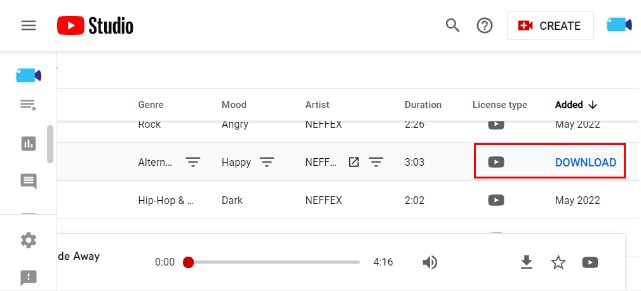
To make videos with iMovie for publishing on YouTube, it's a good idea to download free music for iMovie from YouTube's own audio library. Here is a brief introduction of YouTube Audio Library License: You can use this audio track in any of your videos, including videos that you monetize. No attribution is required.
As you can see, the interface is very clean and simple. There are 3 tabs on top: Music, Sound Effects and Starred. You can easily hit the search bar to input your keywords or filter the library by checking options in the pop-up list, including Track Title, Genre, Mood, Artist Name, Duration, etc.
To play free YouTube audio, just click the Play button. If it's what you want, simply click the Download button to save it to your computer. Downloading music from YouTube is easier than download video.
FAQs on Free iMovie Music
Are the music on iMovie copyright free?
It's pretty safe to use iMovie music and other content to make video for personal use. But if you make YouTube or Facebook videos to earn money by ads, it can be a copyright infringement. If you want to 100% confirmation, you'd better to request permission from Apple to use any of its content. The given link below is iMovie legal from March 2019.
http://images.apple.com/legal/sla/docs/iMovie.pdf
Copyright laws are tricky and may be different in different countries. For commercial use of iMovie video, it's a good idea to take use of free YouTube audio library, or go for third-party royalty-free music service provider with commercial license provided. You have many choices on the Internet, including but not limited to Envato, EpidemicSound, Artlist.io, and more.
iMovie for Windows | Download | Privacy Policy | Contact Us | iMovie Blog | Store |
Copyright ©
iMovie For Windows Dot Com. All rights reserved.
Browser compatibility : IE/Firefox/Chrome/Opera/Safari/Maxthon/Netscape
